
This is the first post in what I'm calling the Chronicles of Juice, a collection of reusable game-feel components, each built at progressively higher levels. The idea is that Level 1 gets you something functional, and each level after that adds a layer of polish drawn from animation principles. You can stop at whatever level suits your project. I'm learning as I go, and have shared the code at the end, use with caution.
Level 1: The Baseline — Grey Silhouettes
[GIF/VIDEO: Level 1 ghost trail — grey silhouettes trailing behind the dash]
The simplest version. When the player dashes, we spawn a handful of Sprite2D nodes at the character's position, spaced evenly across the dash duration. Each ghost grabs the current animation frame's texture, applies a flat silhouette shader (so the ghost is a solid shape, not a full-colour clone), and fades out over a short time.
That's it. Three ghosts, a quick fade, and suddenly the dash reads as movement rather than a teleport. The silhouette shader is tiny — it just replaces the texture's RGB with a flat colour while keeping the alpha for the sprite's shape:
// shd_silhouette.gdshader
shader_type canvas_item;
varying vec4 v_color;

void vertex() {
    v_color = COLOR;
}

void fragment() {
    COLOR = vec4(v_color.rgb, v_color.a * texture(TEXTURE, UV).a);
}
Even at this basic level, the dash goes from "did something happen?" to "okay, I clearly moved." It's a night-and-day difference for about 30 lines of code.
Animation principle at work: Timing. The interval between ghosts and their fade duration determine whether the trail feels snappy or floaty. Get the timing right and the dash breathes.
Level 2: Tint & Texture — Giving It Identity
[GIF/VIDEO: Level 2 ghost trail — blue-tinted ghosts, toggle between silhouette and textured]
Level 1's grey blobs do the job, but they look generic. Level 2 adds two things: a configurable tint colour (I went with a cool blue — Color(0.5, 0.7, 1.0)) and a toggle to show the actual sprite texture instead of a flat silhouette.
The tint is applied through the sprite's modulate property, so it's free. The texture toggle just skips applying the silhouette shader, letting the original sprite art show through. Both options have their uses — silhouettes read more cleanly in busy scenes, but textured ghosts look better for showcasing art.
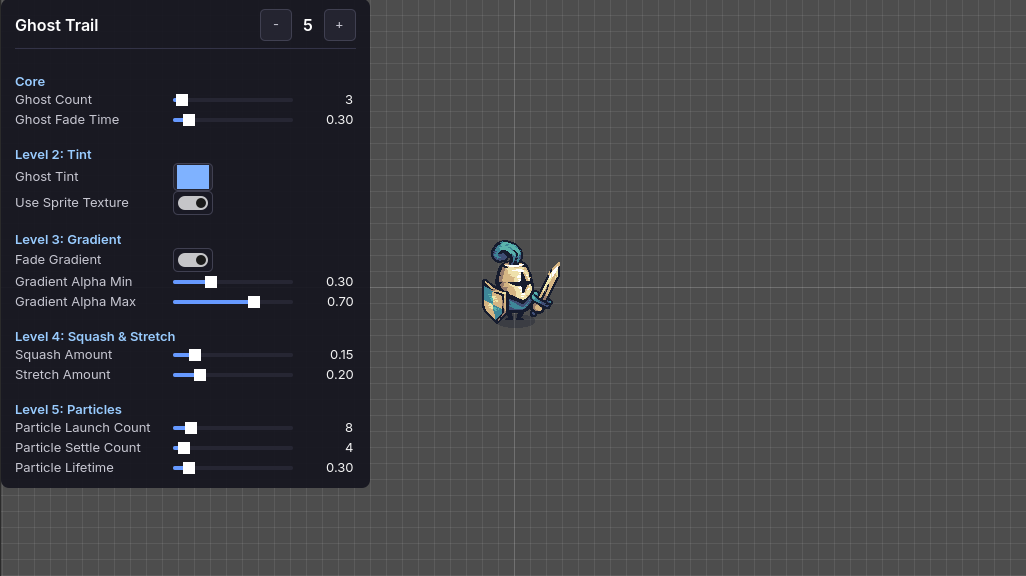
This level is pure configuration. No new systems, no new nodes. Just two parameters exposed on the GhostTrailConfig resource: ghost_tint and use_sprite_texture. The whole component is driven by a single Resource file, so tweaking these values doesn't touch any code.
Animation principle at work: Staging. The tint colour guides the player's eye. A cool blue trail against warm environment art directs attention to the dash without competing with the character sprite itself.
Level 3: Gradient Fade — Depth Through Opacity
[GIF/VIDEO: Level 3 ghost trail — ghosts with gradient alpha, oldest faintest, newest brightest]
Here's where it starts to feel good. Instead of all ghosts spawning at the same opacity, Level 3 introduces a gradient: the oldest ghost (spawned first) is the faintest, and the newest ghost (closest to the character) is the brightest. The alpha values interpolate between gradient_alpha_min (0.3) and gradient_alpha_max (0.7).
The maths is simple — a linear lerp based on spawn index:
var t: float = float(index) / float(total - 1)
alpha = lerpf(config.gradient_alpha_min, config.gradient_alpha_max, t)
Such a small change, but it transforms the trail from a flat sequence of copies into something with depth and direction. Your eye naturally follows the gradient from faint to bright, which reinforces the sense of motion even in a still screenshot.
Animation principle at work: Follow-Through. The fading trail behind the character acts like a visual echo of where they've been. It's the same idea as a cape settling after a superhero lands — the motion doesn't just stop, it trails off.
Level 4: Squash & Stretch — Weight and Impact
[GIF/VIDEO: Level 4 ghost trail — squash on dash start, stretch during transit, elastic snap-back on landing]
This is the level that made me grin. When the dash starts, the sprite briefly squashes (compresses along the movement axis), then stretches during transit. When the dash ends, the sprite snaps back to normal scale with a satisfying elastic overshoot.
The trick is that the ghosts inherit the sprite's current scale at spawn time. So the first ghost captures the squash, the middle ghosts capture the stretch, and the trail itself shows the deformation — you get a sense of acceleration and weight baked right into the afterimages.
The implementation uses chained tweens: a quick squash (0.04s), then a stretch (0.06s), then an elastic snap-back on dash end. The axis flips depending on whether you're dashing more horizontally or vertically:
if absf(direction.x) > absf(direction.y):
    squash_scale = Vector2(1.0 - squash, 1.0 + squash)
    stretch_scale = Vector2(1.0 + stretch, 1.0 - stretch)
With default values of squash_amount: 0.15 and stretch_amount: 0.2, the deformation is subtle enough to feel natural but visible enough to register. Crank those values up for a more cartoony look.
Animation principle at work: Squash & Stretch. Literally the first of Disney's twelve principles. Deforming the sprite on acceleration gives the illusion of mass and elasticity — the character feels like it has weight, not like a rigid sprite sliding across the screen.
Level 5: Particles — The Finishing Touch
[GIF/VIDEO: Level 5 ghost trail — full effect with launch burst and landing settle particles]
The final level adds two particle bursts: a launch burst at the dash origin (particles spray opposite to the dash direction, like dust kicked up from a sprint), and a settle burst at the landing point (a smaller upward puff, like the character skidding to a halt).
Both use CPUParticles2D spawned at runtime — no scene instantiation, no particle resource files. Each burst is a one-shot emitter that cleans itself up after its lifetime expires. The launch burst gets 8 particles with a 45° spread, the settle burst gets 4 with a wider 80° spread. All configurable through the resource.
This is where the effect goes from "solid" to "polished." The particles sell the physicality of the dash — there's something pushing off the ground, and something landing on it.
Animation principle at work: Secondary Action. The particles are a secondary action that supports the primary one (the dash). They don't drive the motion; they reinforce it. Remove the particles and the dash still works. Add them and it feels complete.
Summary: The Twelve Principles at Work
Each level of this ghost trail draws from Disney's twelve principles of animation — a framework originally developed for hand-drawn cartoons in the 1930s that turns out to be remarkably useful for game feel. Here's what we used:
| Level | What Changed | Animation Principle |
|---|---|---|
| 1 — Silhouettes | Grey ghost sprites trailing the dash | Timing — ghost spacing and fade duration set the rhythm |
| 2 — Tint & Texture | Coloured ghosts, optional sprite texture | Staging — tint colour directs the eye to the action |
| 3 — Gradient | Oldest ghost faintest, newest brightest | Follow-Through — the trail echoes where the character has been |
| 4 — Squash & Stretch | Sprite deforms on dash start and end | Squash & Stretch — deformation sells weight and elasticity |
| 5 — Particles | Launch burst and landing settle | Secondary Action — particles reinforce the primary motion |
The full list of twelve principles includes Anticipation, Slow In & Slow Out, Arcs, Exaggeration, Solid Drawing, Appeal, Straight Ahead vs Pose to Pose, and Overlapping Action. We'll hit more of them in future entries.
The beautiful thing about this layered approach is that every level is a valid stopping point. Level 1 is a perfectly serviceable ghost trail. Level 3 is great for most games. Levels 4 and 5 are polish you add when the core feel is locked in and you want that extra crunch.
The Full Level 5 Component
Here's the complete ghost_trail.gd — drop it onto any node that has access to an AnimatedSprite2D and a DashMovement component, wire up a GhostTrailConfig resource, and set juice_level to taste.
class_name GhostTrail
extends Node

signal juice_level_changed(new_level: int)

@export var config: GhostTrailConfig
@export var juice_level: int = 0:
    set(value):
        juice_level = clampi(value, 0, max_level)
        juice_level_changed.emit(juice_level)
@export var sprite: AnimatedSprite2D
@export var follow_target: Node2D
@export var dash_movement: DashMovement

var effect_name: StringName = &"Ghost Trail"
var max_level: int = 5

var _dash_duration: float = 0.2
var _squash_stretch_tween: Tween
var _dash_origin: Vector2 = Vector2.ZERO
var _silhouette_shader: Shader = preload(
    "res://project/components/ghost_trail/shd_silhouette.gdshader"
)


func _ready() -> void:
    add_to_group(&"juice_effect")
    if not config:
        config = GhostTrailConfig.new()
    if dash_movement:
        dash_movement.dash_started.connect(_on_dash_started)
        dash_movement.dash_finished.connect(_on_dash_finished)
        if dash_movement.config:
            _dash_duration = dash_movement.config.dash_duration


func _spawn_ghost_trail() -> void:
    var count: int = config.ghost_count
    var interval: float = _dash_duration / float(count)
    for i: int in count:
        get_tree().create_timer(interval * float(i), false).timeout.connect(
            _spawn_single_ghost.bind(i, count)
        )


func _spawn_single_ghost(index: int, total: int) -> void:
    if not is_instance_valid(sprite) or sprite.sprite_frames == null:
        return

    var ghost := Sprite2D.new()
    var texture: Texture2D = sprite.sprite_frames.get_frame_texture(
        sprite.animation, sprite.frame
    )
    if texture == null:
        ghost.queue_free()
        return
    ghost.texture = texture
    ghost.flip_h = sprite.flip_h
    ghost.offset = sprite.offset

    # Gradient alpha (Level 3+)
    var alpha: float = config.gradient_alpha_max
    if juice_level >= 3 and config.fade_gradient and total > 1:
        var t: float = float(index) / float(total - 1)
        alpha = lerpf(config.gradient_alpha_min, config.gradient_alpha_max, t)

    # Tint colour (Level 2+) or default grey
    var color: Color
    if juice_level >= 2:
        color = Color(
            config.ghost_tint.r, config.ghost_tint.g,
            config.ghost_tint.b, alpha
        )
    else:
        color = Color(0.6, 0.6, 0.6, alpha)

    ghost.modulate = color
    ghost.global_position = sprite.global_position
    if follow_target:
        ghost.z_index = follow_target.z_index - 1

    # Silhouette shader (solid shape, no texture detail)
    if juice_level < 2 or not config.use_sprite_texture:
        var mat := ShaderMaterial.new()
        mat.shader = _silhouette_shader
        ghost.material = mat

    # Inherit squash/stretch scale (Level 4+)
    if juice_level >= 4:
        ghost.scale = sprite.scale

    get_tree().current_scene.add_child(ghost)

    # Fade out
    var tween: Tween = ghost.create_tween()
    tween.tween_property(ghost, "modulate:a", 0.0, config.ghost_fade_time) \
        .set_ease(Tween.EASE_IN).set_trans(Tween.TRANS_QUAD)
    tween.tween_callback(ghost.queue_free)


func _apply_squash_stretch(direction: Vector2) -> void:
    if not is_instance_valid(sprite):
        return
    if _squash_stretch_tween and _squash_stretch_tween.is_valid():
        _squash_stretch_tween.kill()

    var squash: float = config.squash_amount
    var stretch: float = config.stretch_amount
    var squash_scale := Vector2(1.0 + squash, 1.0 - squash)
    var stretch_scale := Vector2(1.0 - stretch, 1.0 + stretch)

    if absf(direction.x) > absf(direction.y):
        squash_scale = Vector2(1.0 - squash, 1.0 + squash)
        stretch_scale = Vector2(1.0 + stretch, 1.0 - stretch)

    _squash_stretch_tween = sprite.create_tween()
    _squash_stretch_tween.tween_property(
        sprite, "scale", squash_scale, 0.04
    ).set_trans(Tween.TRANS_QUAD).set_ease(Tween.EASE_OUT)
    _squash_stretch_tween.tween_property(
        sprite, "scale", stretch_scale, 0.06
    ).set_trans(Tween.TRANS_QUAD).set_ease(Tween.EASE_IN)


func _restore_sprite_scale() -> void:
    if not is_instance_valid(sprite):
        return
    if _squash_stretch_tween and _squash_stretch_tween.is_valid():
        _squash_stretch_tween.kill()
    _squash_stretch_tween = sprite.create_tween()
    _squash_stretch_tween.tween_property(
        sprite, "scale", Vector2.ONE, 0.1
    ).set_trans(Tween.TRANS_ELASTIC).set_ease(Tween.EASE_OUT)


func _spawn_launch_particles(direction: Vector2) -> void:
    var particles := CPUParticles2D.new()
    particles.emitting = false
    particles.one_shot = true
    particles.amount = config.particle_launch_count
    particles.lifetime = config.particle_lifetime
    particles.explosiveness = 0.9
    particles.direction = -direction
    particles.spread = 45.0
    particles.initial_velocity_min = 80.0
    particles.initial_velocity_max = 140.0
    particles.gravity = Vector2(0.0, 200.0)
    particles.scale_amount_min = 0.5
    particles.scale_amount_max = 1.5
    particles.color = Color(1.0, 1.0, 1.0, 0.6)
    particles.global_position = _dash_origin

    get_tree().current_scene.add_child(particles)
    particles.emitting = true
    get_tree().create_timer(
        config.particle_lifetime + 0.1, false
    ).timeout.connect(particles.queue_free)


func _spawn_settle_particles() -> void:
    var particles := CPUParticles2D.new()
    particles.emitting = false
    particles.one_shot = true
    particles.amount = config.particle_settle_count
    particles.lifetime = config.particle_lifetime * 0.7
    particles.explosiveness = 0.9
    particles.direction = Vector2.UP
    particles.spread = 80.0
    particles.initial_velocity_min = 30.0
    particles.initial_velocity_max = 60.0
    particles.gravity = Vector2(0.0, 150.0)
    particles.scale_amount_min = 0.3
    particles.scale_amount_max = 1.0
    particles.color = Color(1.0, 1.0, 1.0, 0.4)
    if follow_target:
        particles.global_position = follow_target.global_position

    get_tree().current_scene.add_child(particles)
    particles.emitting = true
    get_tree().create_timer(
        config.particle_lifetime + 0.1, false
    ).timeout.connect(particles.queue_free)


func _on_dash_started(direction: Vector2, _speed: float) -> void:
    if juice_level < 1:
        return
    if follow_target:
        _dash_origin = follow_target.global_position
    if juice_level >= 4:
        _apply_squash_stretch(direction)
    if juice_level >= 5:
        _spawn_launch_particles(direction)
    _spawn_ghost_trail()


func _on_dash_finished() -> void:
    if juice_level >= 4:
        _restore_sprite_scale()
    if juice_level >= 5:
        _spawn_settle_particles()
And the config resource that drives it:
class_name GhostTrailConfig
extends Resource

@export var ghost_count: int = 3
@export var ghost_fade_time: float = 0.3
@export var ghost_tint: Color = Color(0.5, 0.7, 1.0, 1.0)
@export var use_sprite_texture: bool = true
@export var fade_gradient: bool = true
@export var gradient_alpha_min: float = 0.3
@export var gradient_alpha_max: float = 0.7
@export var squash_amount: float = 0.15
@export var stretch_amount: float = 0.2
@export var particle_launch_count: int = 8
@export var particle_settle_count: int = 4
@export var particle_lifetime: float = 0.3
This is the first entry in the Chronicles of Juice Series. Next up: Floating Damage Numbers, making hits feel like they mean something. If you found this useful, or if you've built something similar and have thoughts on how I could improve it, I'd love to hear about it.